FAQ for engineers
Before you hand work to an AI, find out how ParallelSandbox works, where your code and data go, and what stays behind. This page is for people; the AI reads SKILL.md and the tool reference.
ParallelSandbox is operated by your AI: starting boxes, setting things up and deleting them are things you ask your AI for in a sentence, and it calls the matching tool or REST endpoint. The sandbox_* tools and /v1/... endpoints below are there so you know what it actually does.
What can ParallelSandbox do for me?
- Your AI (Claude Code, Codex, Cursor, Gemini CLI, or any client that speaks MCP) opens a box for each piece of work: a small remote Linux virtual machine with Docker, git, Node, Go, Chromium and a virtual display.
- In the box the AI runs the services you changed, tests them in a real browser or an Android or iPhone simulator, takes screenshots and recordings, and hands the result to you to try in the app ("Ready for you"). You circle what is wrong and say what you see; your feedback goes back to the same conversation.
- One box per piece of work, isolated from each other. Several can run at once without fighting over ports, databases or your own machine.
- There is no AI inside the box. Your own AI does the work through MCP tools; ParallelSandbox itself never sends your code to an AI model.
What is a box like?
An x86_64 Linux machine (Debian 12). Each size unit is 2 vCPU, 8 GB of memory and 40 GB of disk, and a box is 1, 2, 4 or 8 units. Docker, git, Node, Go, Python, PHP, Chromium and a virtual display are built in; Java, Android, .NET, Rust and Flutter toolchains are added when needed.
Where do I start?
- See the real flow first: the example repos are two public repos that run locally with
docker compose up, and the page lists every step of running them in a box. - Connect: paste the line from the quick start into your AI. It installs the skill and signs in to your account with OAuth; you do not hand it any key.
- Make the first task small, for example "run this repo in a box, test the home page in a browser, and hand it to me for review".
What does the architecture look like?
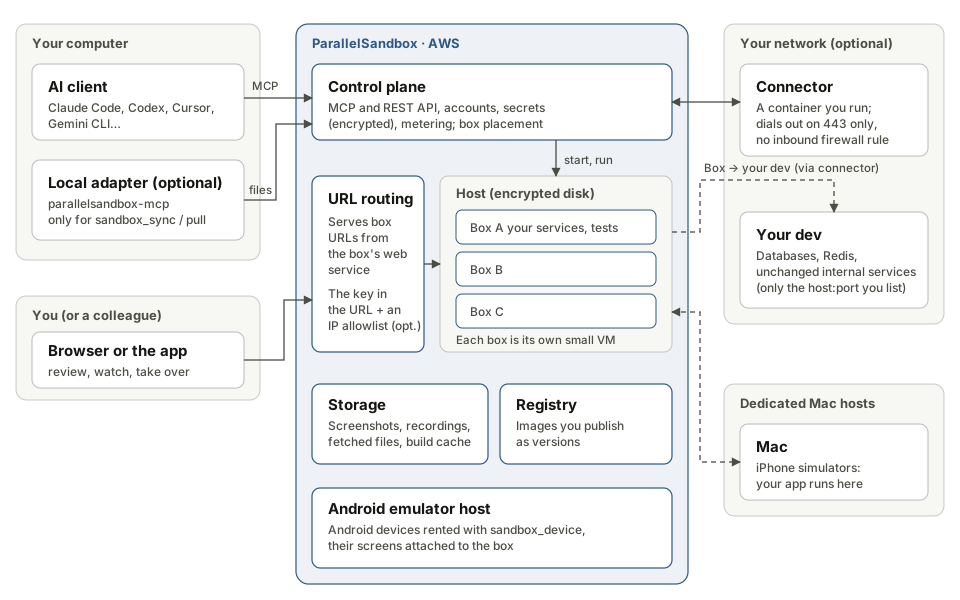
| Part | Where | What it does |
|---|---|---|
| Your AI client | Your computer | Calls the MCP tools: start a box, run commands, take screenshots, hand over |
Local adapter parallelsandbox-mcp (optional) |
Your computer | Needed only to send a local folder into a box (sandbox_sync) or pull files back to your machine (sandbox_pull) |
| Control plane | AWS | MCP and REST API, accounts, secrets, metering |
| Hosts and boxes | AWS | Each box is its own small virtual machine with its own disk and network, isolated from the others |
| URL routing | AWS | Serves URLs like https://<id>-<key>.box.parallelsandbox.com from the web service in the box |
| Storage and registry | AWS | Screenshots and recordings, fetched files, the build cache, the images you publish |
| Android emulators | AWS | Android devices rented with sandbox_device |
| iPhone simulators | Dedicated Mac hosts | iPhone devices rented with sandbox_device |
| Connector (optional) | Your network | A container you run; it dials out to ParallelSandbox so boxes can reach the dev databases and services you list |
How does one piece of work run, start to finish?
- Start: the AI calls
sandbox_startwith what the box is for, the services it runs and the ports they listen on, the secrets to bring and the environment to plug into. The box starts from a clean snapshot that holds no account data. - Code in: the AI runs
git clonein the box, or sends your local working tree into the box through the ParallelSandbox API withsandbox_sync. - Run and test: the AI builds, starts services and runs tests with
sandbox_exec, and takes screenshots and recordings withsandbox_shot. - Hand over: the AI hands the box to you with
sandbox_review. It shows up under "Ready for you" in the app; you open the page or the simulator, use it, and circle anything wrong. - Stop: once you are done, the AI calls
sandbox_stop(or you tap "Shut down" in the app) and the box's disk is deleted with it. Commit, push or pull back anything you want to keep before that.
How long does a box stay?
- 10 minutes without activity → frozen: no credits are charged, memory and
/workare kept, and the next call wakes it in a few seconds. - 24 hours after its last use → stopped for good, disk deleted. To keep it longer, tell your AI "keep this box for 3 days"; it sets that when it starts the box, up to 7 days.
- Once stopped, the box's URLs stop working and
/workdoes not come back; a new box has new URLs.
My frontend and backend live in several repos. How does a box run them?
Can one box run several repos?
Yes. A box is a Linux machine: the AI can clone several repos under /work and run them together with docker compose or their own commands. Services find each other by name (for example api:3000), just like compose on your machine.
Or one box per service?
That works too. With services in different boxes, a link points a name in box B at a port in box A: the programs in B call the host name they always use, with no config change. It fits two people (or two AI conversations) each changing one service and testing them together.
Can boxes opened by two different people be linked?
Yes, as long as they are in the same account: a team shares one ParallelSandbox account (see team setup), which holds the boxes, environments, secrets, published versions and credits. Links only connect boxes of the same account. An account has no members or roles for now.
What about the services I did not change?
It depends on where they run:
| Situation | What to do |
|---|---|
| They run in your dev or staging (AWS, Kubernetes, an office) | Create an environment: run the connector in your network and list the host:port addresses boxes may reach. A box then reaches the copy on your dev by its usual host name: the database, Redis and internal services alike. |
| It is an HTTP service with a URL | Give externalBaseUrl when the box starts; HTTP to that service's name in the box goes to that URL. |
| Someone already built it and published a version | Declare that version in services when the box starts; the box pulls the image and runs it without rebuilding (run a published version). |
Your AI sets environments up over REST; there is no screen for it. All you do is run the connector in your own network (one docker run line). New addresses or settings on an environment reach only boxes started afterwards.
And services I do not own (another team, a third party)?
If your network reaches it, a box can too: run a connector where it is reachable and list its host:port. External services that only accept known IPs are listed the same way, and the traffic leaves from your own network with your public IP. A service you cannot reach yourself, a box cannot reach either.
Can a service on my dev call the copy I changed in the box?
Not over your private network: the connector only lets boxes connect out, and nothing on your network can connect into a box through it; a service on your dev that calls an internal host name keeps calling the copy on your dev.
The box's public URL (https://<id>-<key>.box.parallelsandbox.com), on the other hand, is reachable by anything on the internet, so callbacks such as webhooks can point at it.
To test "caller → changed service", the simplest way is to put the caller in the same box too, or in another box linked to it.
My code and data
Will the box always have my whole repo?
Not necessarily. It depends on how the AI puts it there:
git clone: the box fetches it itself. A private repo needs a token stored as a secret first (for exampleGITHUB_TOKEN), which the AI names when it starts the box.sandbox_sync: sent from your computer. Only files git tracks, plus new files.gitignoredoes not exclude; or only the tree of one commit. Ignored files (.envandnode_modulesin most projects) are not sent by default.
Keep files you do not want sent in .gitignore, or ask the AI to send only a commit.
Where do my code and data go?
- Boxes, the control plane, storage, the registry and the log service all run on AWS.
- When you use an iPhone simulator, the app you built is sent to a dedicated Mac host and installed and run there.
- A box connects wherever your programs connect: npm, GitHub, your dev, third-party APIs.
- Traffic from a box to your dev goes through ParallelSandbox to your connector; the connector talks to ParallelSandbox over TLS, and your services' own TLS (your database's SSL, for example) is not unwrapped between the box and your service.
- ParallelSandbox itself never gives your code to an AI model. What your AI sees (command output, screenshots) reaches your AI provider through your AI client, just as it does when you use it locally.
- Voice input in the app is turned into text as you speak; neither the audio nor the text is stored.
The full details are in the privacy policy.
When a box stops, is its disk really wiped?
Yes:
- When a box stops, its virtual machine is shut down and its disk file is deleted right away. Host disks are encrypted, and the whole disk is deleted when the host goes away.
- While a box is frozen, its memory and
/workmay be kept in encrypted storage; they are deleted when the box resumes or stops. There is also a 10-day upper limit as a safety net, which normal use never reaches. - To be precise: this is "delete the files on encrypted disks", not overwriting every block.
What is kept, for how long, and can it be deleted?
To delete something, tell your AI (for example "delete this box's screenshots" or "clear the build cache"); it calls the REST endpoint in the table.
| Data | Where | Kept | How to delete |
|---|---|---|---|
The box's /work (code, containers, databases) |
The box's disk on its host | Deleted when the box stops; it stops by itself 24 hours after its last use (up to 7 days if set) | sandbox_stop, or "Shut down" in the app |
Files from sandbox_get and sandbox_pull |
Storage on AWS | About 1 day | Deleted automatically |
| Screenshots and recordings | Storage on AWS | 7 days | DELETE /v1/boxes/{id}/media, one box at a time |
| Frozen-box posters, review card images | Storage on AWS | Only the latest one per box | Same as above |
Build cache (sandbox_build) |
Storage on AWS | At most 20 GB per account, oldest removed first | DELETE /v1/build-cache, the whole account at once |
| Images published as versions | Your account's image registry | No limit | DELETE /v1/versions/{id}, which also deletes the image when no other version uses it |
| Logs and source maps | Log service | Until you delete the log project | DELETE /v1/projects/{id} (log.parallelsandbox.com) |
| Secrets | Control plane database, encrypted | Until you delete them | Secrets in the app's settings, or DELETE /v1/secrets/{name} |
| An environment's service settings (environment variables) | Control plane database, encrypted | Until you delete them | DELETE /v1/environments/{env}/services/{name} |
| Messages and activity records in the app | Control plane database | 7 days | Deleted automatically |
When you delete your account, running boxes stop and all of the above is deleted within 30 days at the latest. The REST details are on the REST page.
Who can open a box's URL? Can I add a login or limit it by IP?
- A box URL looks like
https://<id>-<key>.box.parallelsandbox.com. Thekeyis random, and a wrong one gets the same 404 as a box that does not exist; anyone with the full URL can open it, so treat it like a share link. - To limit where it can be opened from, give the account an IP allowlist: tell your AI "open box URLs only to our office's 203.0.113.0/24", and it calls
PUT /v1/box-access. About 3 seconds later every box URL of the account accepts only those IPs; anything else gets 403 and does not wake a frozen box. There is one list per account, at most 50 entries, and only IPv4 is matched for now; to turn it off, ask for an empty list. - It suits teams with a company VPN or a fixed office IP. A colleague opening a review URL, or you testing on a phone over mobile data, must come from a listed IP (connect to the VPN first, say).
- There is no extra login: a review URL has to work for a colleague straight away, without a ParallelSandbox account.
- The takeover page and the app do not rely on the key in the URL: a takeover link is a one-time, expiring token from the control plane, and the app uses your sign-in.
Databases and test data
Is every box a fresh environment?
Yes. Every box starts from the same clean snapshot, and a database running in the box lives only until the box stops. The same box keeps it while frozen (see how long does a box stay?), but there is no persistent disk shared across boxes like a Kubernetes PVC.
How do my services' environment variables (DATABASE_URL and so on) get into a box?
Store them as an environment's service settings: import them from AWS ECS (with the SSM parameters and Secrets Manager values they reference), or upload a .env. A box started with that environment has /work/.sbx/env/<service>.env, and a changed service starts with it, configured exactly as on your dev. The settings are stored encrypted and the API returns only variable names; changed settings reach only boxes started afterwards.
Can I connect to my dev database directly?
Yes: an environment plus a connector, with the service settings from the previous answer. Note: when a changed service starts with your dev settings, its migrations and writes land in your dev database for real.
I have a set of test data I want to keep using, without migrating and seeding every time.
Keep that database in your own network (for example a Postgres in your dev just for tests) and let boxes reach it through an environment's connector. The data and the migration state stay with you, and every box carries on from where the last one left it. This is the only way to keep it for good today: ParallelSandbox does not keep the databases inside boxes for you.
I want a clean database every time.
Run psbx-testdb up <name> in the box: it starts a fresh Postgres 16 (or MySQL 8.0 with --mysql) and writes its DATABASE_URL to /work/.sbx/testdb/<name>.env; psbx-testdb reset <name> empties it again, and psbx-testdb gotest ./... gives every Go package a database of its own. Start other databases with your usual docker compose.
In one line: what stays and what does not?
- Does not stay: everything inside the box (code, containers, databases,
/work) is gone when the box stops. - Stays: what is in your own network (a database reached through the connector), images published to the registry, the build cache, and the stored files in the table above, each with its own limit.
Secrets
Where are secrets stored, and how do they reach a box?
- One list for the whole account, stored encrypted in the control plane. Not one set per box.
- Nothing goes into a box by default. The AI names the ones it needs when it starts the box, the box receives them the moment it is claimed, and they become environment variables of every command; they disappear with the box.
- A stored value cannot be read back: tool results,
sandbox_statusand platform logs only show names. - Inside the box a secret is an environment variable. When a command prints it, what comes back to your AI has it masked as
****(values of 8 characters or more), as are the secret-looking dev settings an environment puts in the box; files in the box, such as a log the program writes, still hold the real value, so do not fetch them to your AI if they may contain one. - Do not store ParallelSandbox's own API key as a secret; the box does not need it.
Is there a settings screen?
Yes: in app.parallelsandbox.com, the gear at the top right → Settings → Secrets. You can add, replace and delete them; it lists names and when each was last updated, and never shows a value. A value typed in the app never passes through your conversation with the AI, so it never reaches your AI provider; when the token is in your hands, use this. Your AI can also store one over REST (Secrets).
What if my program needs AWS permissions (S3, SQS)?
Do not store long-lived keys. Name an AWS role on the environment, and the box trades an OIDC token for temporary credentials that expire after an hour, the same way GitHub Actions connects to AWS (AWS permissions inside a box). ParallelSandbox holds no long-lived access to your AWS account.
Cost
- A box is charged per minute from the moment it is ready; frozen boxes are free. It freezes after 10 minutes with no activity, so a box you forgot to stop does not keep burning credits.
- Outbound traffic, logs and stored files are metered separately; environments and connectors are free. Rates are on Credits.
Example repos
| Repo | What it shows |
|---|---|
| example-compose-app | A Node API and a Go worker wired together with compose; Playwright runs e2e in a real browser on the box's screen, with a recording, screenshots and a hand-over |
| example-web-with-logs | A web page with the log SDK; error stacks restored with source maps; the write key brought into the box as a secret |
Every tool call is on the example repos page. A full example with several services, a dev split between AWS and an office network, connectors, and using a changed service from another box is in team setup.